

A great product is not enough to guarantee success. Your customer's first few interactions determine whether they become a loyal advocate or a churn statistic. With rising acquisition costs and fierce competition, a frictionless, value-driven onboarding experience is no longer a luxury. It is the most critical growth lever for modern SaaS businesses.
Yet, many teams struggle with stalled signups and early user abandonment, unsure where to focus their efforts to make a real impact.
This guide cuts through the noise. We have compiled nine essential customer onboarding best practices, moving beyond generic advice to provide actionable strategies and practical guidance. You will not find vague theories here. Instead, this article delivers specific, implementation-ready tactics to help you design a process that actively guides users toward their "aha!" moment.
From creating a personalized welcome to leveraging data for continuous improvement, each point is designed to help you transform new signups into dedicated power users. These strategies will help you reduce early churn, increase user activation rates, and build a foundation for long-term customer loyalty and growth, starting from day one.
1. Personalized Welcome Experience
A one-size-fits-all onboarding process treats every customer the same, ignoring their unique goals and challenges. A personalized welcome experience, however, customizes the initial journey based on a user's role, industry, or stated goals. This approach immediately demonstrates that you understand their specific needs, increasing engagement and accelerating their time-to-value.
For example, Canva asks users why they signed up (e.g., as a teacher, student, or small business owner) and then customizes the dashboard and initial template suggestions accordingly. Similarly, HubSpot offers distinct onboarding paths for marketers versus salespeople, focusing on the features most relevant to each role. This level of tailoring makes users feel seen and guided, which is a cornerstone of modern customer onboarding best practices.
How to Implement a Personalized Welcome
- Segment Your Users: Start by identifying 3-5 key customer segments. You can collect this data during signup with a simple dropdown asking for their role or industry.
- Deploy Dynamic Content: Use the segment data to deliver customized welcome emails, in-app messages, and product tours that speak directly to their use case.
- Gather Data Progressively: Avoid overwhelming new users with long forms. Instead, use progressive profiling to ask for more information over time as they engage with your product.
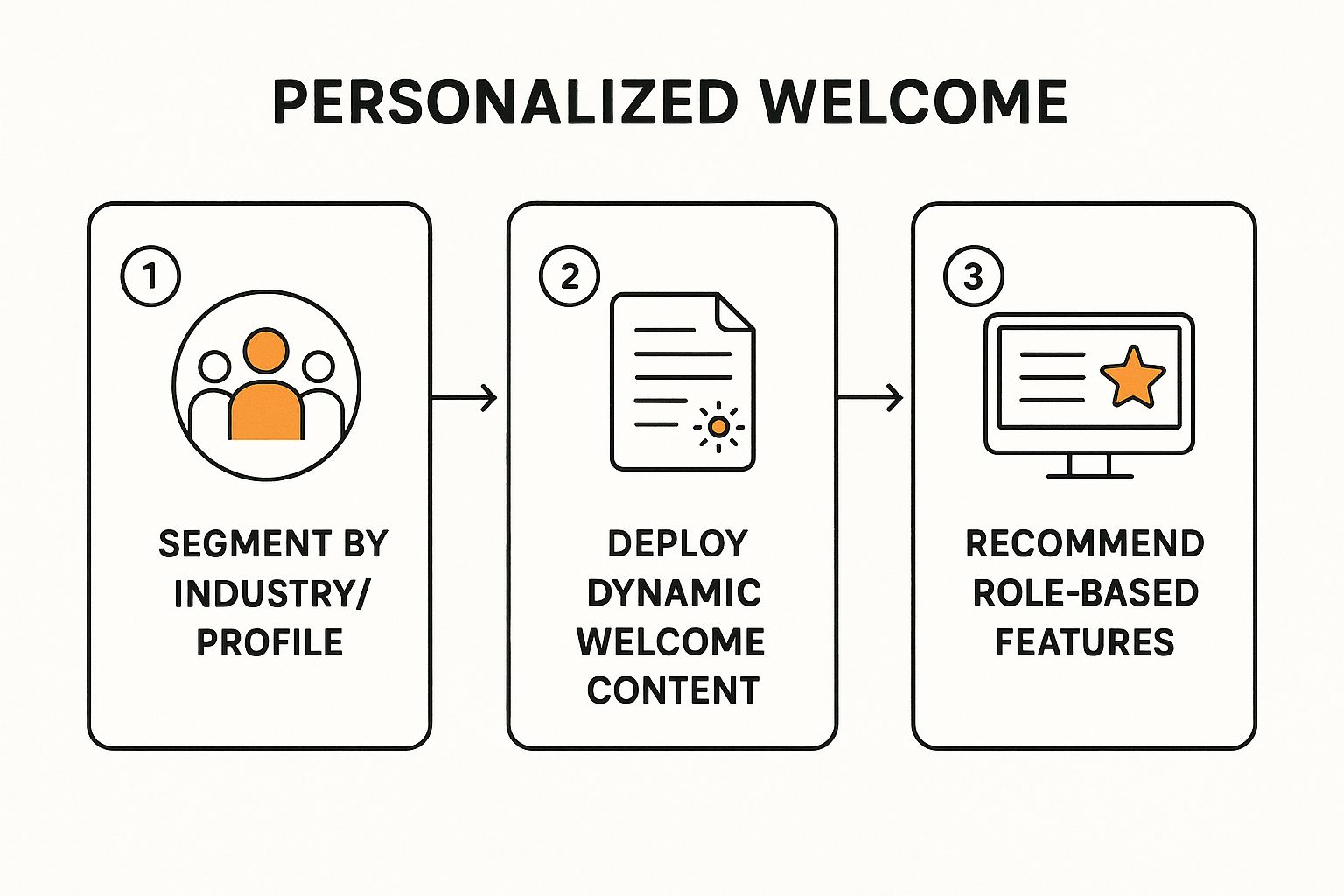
Personalized onboarding immediately demonstrates that you understand your users' specific needs, accelerating their time-to-value.
2. Progressive Disclosure and Gradual Engagement
Bombarding a new user with every single feature your product offers is a surefire way to cause confusion and frustration. Progressive disclosure is a customer onboarding best practice that strategically introduces functionality incrementally. This approach guides users to their first success quickly by focusing on core features, then gradually reveals more advanced options as they become comfortable and their needs evolve.
For example, Duolingo starts users with simple vocabulary lessons before introducing complex grammar rules. Similarly, Notion guides new users to create basic text blocks and to-do lists before revealing powerful database features. This methodical layering prevents cognitive overload, making the product feel intuitive and manageable. By revealing complexity over time, you build user confidence and create a smooth learning curve.
How to Implement Progressive Disclosure
- Map the "First Win" Journey: Identify the quickest path for a new user to achieve a meaningful outcome. Remove any unnecessary steps, fields, or distractions from this initial workflow.
- Introduce Core Features First: Limit the initial onboarding tour or checklist to the 3-5 essential features required for that first win. Hide or de-emphasize advanced functionality for now.
- Use Contextual Triggers: Reveal new features at the moment they become relevant. For instance, after a user has created several tasks, you could introduce a tooltip that explains how to group them into a project.
- Provide an 'Advanced' Opt-Out: Allow power users who are already familiar with similar tools to skip the basics and unlock the full feature set from the beginning.
Progressive disclosure prevents cognitive overload by revealing complexity over time, building user confidence and creating a smooth learning curve.
3. Clear Value Proposition and Quick Wins
Many onboarding processes focus on teaching features instead of delivering value. A superior approach is to guide new users to a "quick win" or an "aha moment" as rapidly as possible. This practice prioritizes demonstrating your product's core value within the first session, creating an early success story that builds user confidence and momentum. It answers the user's implicit question: "Is this worth my time?"
For instance, Grammarly provides immediate value by checking the first piece of text a user types, showing corrections and improvements in seconds. Similarly, Calendly guides you to create and share your first meeting link right away, instantly showcasing its time-saving power. This focus on immediate, tangible outcomes is a critical component of modern customer onboarding best practices, as it helps prevent early user churn. To learn more about this, you can read about why 40% of users never return after the first visit.
How to Deliver Quick Wins
- Identify Your "Aha Moment": Analyze data from your most successful users to pinpoint the key action or outcome that led to their long-term retention.
- Streamline the Path to Value: Remove any non-essential steps, fields, or tutorials that stand between a new user and their first quick win. Make this path the top priority.
- Use Templates and Sample Data: Pre-populate projects or workspaces with sample data or templates to help users visualize the end result and achieve value faster.
- Celebrate Success: Acknowledge the user's first key achievement with a congratulatory message or a subtle animation. This positive reinforcement encourages further exploration.
4. Interactive Product Tours and Walkthroughs
Passive onboarding methods like videos or lengthy help docs force users to learn outside your application and then try to recall the information later. Interactive product tours and walkthroughs solve this by teaching users while they are doing. This hands-on approach uses tooltips, modals, and hotspots to guide users step-by-step through key workflows directly within the product environment, solidifying learning and accelerating proficiency.

For instance, Airtable provides interactive tours that guide new users on how to create a base, add fields, and switch between different views. Miro uses a similar strategy, prompting users to add their first shapes and sticky notes to a new board. This "learning by doing" method is a fundamental customer onboarding best practice because it helps users achieve their first "aha!" moment faster, building momentum and confidence from their very first session.
How to Implement Interactive Product Tours
- Keep It Short and Focused: Limit tours to 5-7 steps maximum and concentrate on a single, high-value workflow. Trying to show everything at once leads to user fatigue.
- Provide an Exit: Always include a clear and obvious way for users to skip or exit the tour. Forcing a walkthrough can create a frustrating experience for those who prefer to explore on their own.
- Use Realistic Data: Guide users through tasks using realistic sample data rather than abstract placeholders like "test" or "example." This helps them better understand the feature's real-world application.
Interactive tours teach users while they're doing, solidifying learning and accelerating proficiency through hands-on experience.
5. Multi-Channel Onboarding Communication
Relying on a single communication channel for onboarding, like email, ignores how users naturally interact with technology. Multi-channel onboarding communication coordinates the user experience across various touchpoints, including in-app messages, email sequences, and human outreach. This holistic approach ensures consistent and complementary messaging, creating a comprehensive support system that meets users where they are.
For example, Zendesk combines in-app guidance for feature discovery with email drip campaigns that offer deeper insights. For enterprise customers, they add webinar invitations and proactive outreach from a Customer Success Manager, creating a layered and supportive journey. This strategy is a core part of modern customer onboarding best practices because it acknowledges that different messages are best suited for different channels, providing a seamless experience.
How to Implement Multi-Channel Communication
- Map the Journey and Channels: Identify key moments in the user journey and assign the most effective channel for each message. Use in-app for contextual guidance and email for information a user might need to reference later.
- Use Behavioral Triggers: Instead of just sending time-based messages, trigger communications based on user actions (or inaction). This makes your outreach more relevant and timely.
- Integrate Human Touchpoints: For high-value or complex accounts, supplement automated messages with strategic outreach from a success or support team member to build relationships and resolve complex issues. For a deeper dive into how platforms like Mailchimp can orchestrate these campaigns, you can explore multi-channel strategies in more detail.
6. Self-Service Resources and Knowledge Base
Relying solely on guided tours and support teams creates dependencies that can slow users down. A robust collection of self-service resources empowers users to find answers independently, on their own schedule. By creating a well-organized and easily searchable knowledge base, you provide a safety net that encourages exploration and builds user confidence. This is a critical component of scalable customer onboarding best practices.
For example, Stripe's documentation is famous for its clarity, offering comprehensive API guides and code examples that developers love. Similarly, Webflow University provides extensive video courses and tutorials that cater to visual learners, turning a complex product into something accessible. These resources don't just answer questions. They teach users how to become experts, which fosters long-term loyalty and product adoption.
How to Implement Self-Service Resources
- Organize Content Intuitively: Structure your knowledge base around user journey stages or common tasks, not just product features. Use clear, jargon-free language.
- Leverage Visual Aids: Incorporate screenshots, annotated images, and short video tutorials to explain complex processes. Visuals are often easier to follow than text-only instructions.
- Enable User Feedback: Add a simple "Was this article helpful?" prompt to every resource. Use this feedback to continuously track which articles are most viewed and improve them over time.
- Integrate Resources Contextually: Link to relevant help articles directly from in-app tooltips, error messages, and feature announcements to provide help exactly when and where it's needed.
Self-service resources don't just answer questions. They teach users how to become experts, fostering long-term loyalty and product adoption.
7. Progress Tracking and Gamification
Leaving new users to navigate your product without a map can lead to confusion and abandonment. Progress tracking and gamification provide that map, using visual cues like checklists and progress bars to show users where they are, what they've accomplished, and what's next. This taps into our natural desire for completion and achievement, transforming onboarding from a chore into an engaging and motivating experience.
For instance, LinkedIn's profile strength meter is a classic example, visually encouraging users to add more information to reach 100% completion. Similarly, Duolingo masterfully uses streaks, XP points, and badges to turn language learning into a compelling game, keeping users coming back daily. These techniques are central to effective customer onboarding best practices because they provide clear direction and positive reinforcement.

How to Implement Progress Tracking and Gamification
- Make Progress Visible Immediately: Start users with a sense of momentum by pre-populating a checklist or setting their progress bar to 10-20% complete.
- Break Down the Journey: Structure the onboarding flow into 5-7 meaningful, high-value steps. Avoid overwhelming users with too many small, arbitrary tasks.
- Celebrate Milestones: Use micro-interactions, like celebratory animations or congratulatory messages, to acknowledge when a user completes a key step. This reinforces their progress and builds positive sentiment.
- Show What's Left: Frame progress not just by what's been done, but also by what's left to do. Clearly communicating the path to completion reduces user anxiety and encourages them to finish.
8. Proactive Human Touch and High-Touch Support
While automation scales, it can't replace the value of genuine human connection. A proactive, high-touch support model strategically injects personalized human interaction into the onboarding journey. This approach recognizes that for complex products or high-value accounts, a dedicated guide is essential to navigate initial hurdles, build confidence, and ensure long-term success. It balances automated efficiency with the personalized assurance only a person can provide.
For example, Superhuman famously requires a one-on-one video call to onboard every new user, ensuring they master the tool's powerful shortcuts from day one. Similarly, Salesforce assigns dedicated success managers to its enterprise accounts, offering regular check-ins and strategic guidance. This high-touch model is a critical component of customer onboarding best practices because it transforms a transactional setup process into a relationship-building opportunity, drastically reducing churn for key customer segments.
How to Implement Proactive Human Touch
- Segment for High-Touch: Identify which customers justify the investment of a high-touch model. Focus on enterprise clients, users with complex use cases, or those with high growth potential.
- Trigger Proactive Outreach: Use data like low product usage or missed milestones to trigger outreach from an onboarding specialist. Don't wait for the customer to ask for help.
- Structure Your Calls: Maximize the value of every interaction by preparing a clear agenda for onboarding calls. Follow up with a written summary, action items, and relevant resources.
- Make Scheduling Painless: Remove friction by using tools like Calendly to allow new customers to book time with your team easily. This simple step empowers users and shows respect for their time.
High-touch support transforms a transactional setup process into a relationship-building opportunity, drastically reducing churn for key customer segments.
9. Data-Driven Optimization and Continuous Improvement
Treating onboarding as a "set it and forget it" project is a common mistake. Instead, the most successful companies view it as a dynamic process that requires continuous refinement. Data-driven optimization involves instrumenting every step of the onboarding journey, tracking key metrics to identify friction points, and systematically experimenting with improvements. This scientific approach turns onboarding from guesswork into a predictable engine for growth.
For example, Duolingo runs thousands of A/B tests annually to optimize every micro-interaction, from the first welcome screen to the difficulty of the initial lessons. Similarly, Dropbox famously optimized its signup flow by testing elements like social proof and simplified form fields, significantly boosting conversion rates. This commitment to testing is a core component of modern customer onboarding best practices, ensuring the experience evolves with user behavior and product changes.
How to Implement Data-Driven Optimization
- Instrument Key Events: Use a product analytics tool to track critical onboarding actions, such as "Account Created," "Key Feature Used," and "Invitation Sent." This creates a baseline for measuring performance. For a deeper dive, you can explore various analytics platforms to find the best fit for your needs.
- Identify Drop-Off Points: Analyze your onboarding funnel to find where the largest number of users abandon the process. These high-friction areas are the best places to start your optimization experiments.
- Run Hypothesis-Driven A/B Tests: Formulate a clear hypothesis for any change (e.g., "Changing the CTA button color will increase clicks by 10%"). Test one variable at a time to get clean, actionable results.
- Combine Quantitative and Qualitative Data: While metrics tell you what is happening, user session recordings or surveys can tell you why. Use this qualitative context to inform your hypotheses and understand the user experience more deeply.
From Onboarding to Ongoing Success
Mastering customer onboarding isn't about checking off a list of features. It's about engineering a seamless transition from "new user" to "successful, long-term partner." The journey we've explored through these nine customer onboarding best practices reveals a powerful, interconnected system. It begins with a personalized welcome that makes users feel seen and understood, immediately followed by the delivery of a quick, tangible win that proves your product's value.
This initial spark is then nurtured through strategic guidance. By using progressive disclosure and interactive walkthroughs, you avoid overwhelming users, revealing complexity only as they become ready. This guided experience is reinforced by a steady, helpful presence across multiple channels, from in-app messages to timely emails, ensuring support is always within reach. The goal is to empower users to succeed on their own terms, whether through a robust self-service knowledge base or the motivation provided by gamification and progress tracking.
Turning Theory into Action
Ultimately, the most effective onboarding programs are living, breathing systems. They blend the efficiency of automated processes with the empathy of a proactive human touch for high-value or struggling users. The true engine of growth, however, is a relentless commitment to data-driven improvement. By continuously analyzing user behavior, identifying friction points, and A/B testing your approach, you transform your onboarding from a static checklist into a dynamic, intelligent engine for activation.
Implementing these customer onboarding best practices creates a powerful ripple effect across your entire business:
- Reduced Churn: Users who quickly find value are far less likely to leave.
- Increased Activation Rates: More users will reach that critical "aha!" moment.
- Higher Customer Lifetime Value: Successful onboarding sets the stage for upselling and long-term loyalty.
- Stronger Brand Advocacy: Happy, successful customers become your most effective marketers.
The path forward is clear. Don't try to overhaul everything at once. Start by identifying the single biggest drop-off point in your current onboarding flow. Is it the initial setup? The first interaction with a key feature? Apply one or two relevant strategies from this guide to that specific problem. Small, focused improvements are the building blocks of a world-class customer experience. Remember, the investment you make in a user's first few minutes will pay dividends for years to come.
Ready to stop losing users to poor onboarding? UserBoost tracks your onboarding milestones and automatically sends recovery emails to stuck users. See exactly where users drop off with visual funnels, then set time-based triggers to bring them back. No complex setup—track events from your backend and configure nudges in minutes. Start your free 14-day trial →
Share this article